VOD Audio Language Translator & Dubbing Pipeline (POC)
POC - 2022609-01
Access the Web Application click here
In this Proof of Concept (POC) project, I have developed a robust, containerized web application designed to automate multi-language localization for video content.
The application enables users to upload an MP4 video file, automatically detects the primary spoken language using advanced speech recognition, and translates the audio track into a wide selection of regional languages across Southeast Asia, the Asia-Pacific (APAC), and Europe.
Key Capabilities:
- Automated Audio Extraction & Transcription: Leverages
faster-whisperfor speech detection and text extraction. - Neural Text-to-Speech (TTS) & Subtitling: Integrates DeepL for batch text translation and
edge-ttsto synthesize natural-sounding localized voice tracks, complete with dynamic duration matching and time-sync overlaying viapydub. - Multi-Track MP4 Embedding: Uses
FFmpegto mux the original video stream alongside multiple synchronized dubbing audio tracks and embedded subtitle tracks (mov_text) into a single downloadable MP4 container. - Enterprise Features: Includes secure user authentication (SHA-256), a per-user concurrency control framework, isolated session workspaces, and an administrative management console with encrypted API key storage.
Part 1: User Guide
1. Overview & Authentication
The Regional Multi-Language Video Translator is a web-based application designed to process media files by extracting audio, detecting spoken languages, translating text via DeepL, generating localized audio tracks (TTS), and embedding synchronized subtitle (mov_text) and audio streams into an MP4 container.
- Accessing the App: Open your browser and navigate to
https://service01.yourpersonalmaker.io - Logging In: Enter your assigned username and password on the login screen. By default, an administrator account (
admin/admin123) is pre-configured.
2. Video Processing Workspace
Once authenticated, you will have access to the main workspace tab:
- Upload Video: Drag and drop or upload your source MP4 video into the video input component. The system automatically verifies file size limits against configuration settings.
- Automated Audio Analysis: Upon upload, the app extracts the audio track, loads the configured
faster-whispermodel, detects the primary spoken language and confidence score, and unlocks the processing pipeline. - Configure DeepL API Key: Enter your personal DeepL API key. (Note: If the administrator has enabled and configured a system default DeepL API key in the admin console, this field can be left blank.)
- Select Target Languages: Choose your target languages across three regional dropdown categories:
- South East Asia (SEA): e.g., Thai, Burmese, Malay, Vietnamese, etc.
- Asia Pacific (APAC): e.g., Mandarin (Simplified/Traditional), Japanese, Korean, Hindi, Tamil.
- Europe: e.g., English, French, German, Spanish, Italian, Dutch, Polish, Portuguese, Ukrainian.
- Select Output Options: Choose whether to generate Translated Subtitles (
mov_text), Translated Audio (Dubbing), or both. - Run Processing Pipeline: Click the processing button. The system will transcribe, translate, synthesize synchronized text-to-speech audio chunks via
edge-tts, and mux everything using FFmpeg into a multi-track MP4 output video.
3. Administrator Management Console
Accessible only to users with administrator privileges.
- User Account Roster: View all registered accounts and their respective roles (
AdminorUser) in a dynamic table. - Create User Accounts: Add new users by specifying a username, password, and optional admin privileges.
- Manage Passwords & Deletion: Securely update user passwords or delete user accounts (with safeguards preventing administrators from deleting their own active session or the sole remaining admin account).
- System Configuration: Adjust global parameters including:
- Maximum upload file size limit (MB).
- Maximum concurrent processing requests allowed per user ($N$).
- Default Whisper model size (
tiny,base,small,medium,large-v3). - System-wide default DeepL API key (securely encrypted using Fernet encryption in storage).
- Audit Logs: View real-time system activity logs directly within the UI, with options to refresh or clear logs.
Part 2: System Architecture Diagram
The diagram below illustrates the high-level data flow and modular architecture of the application:
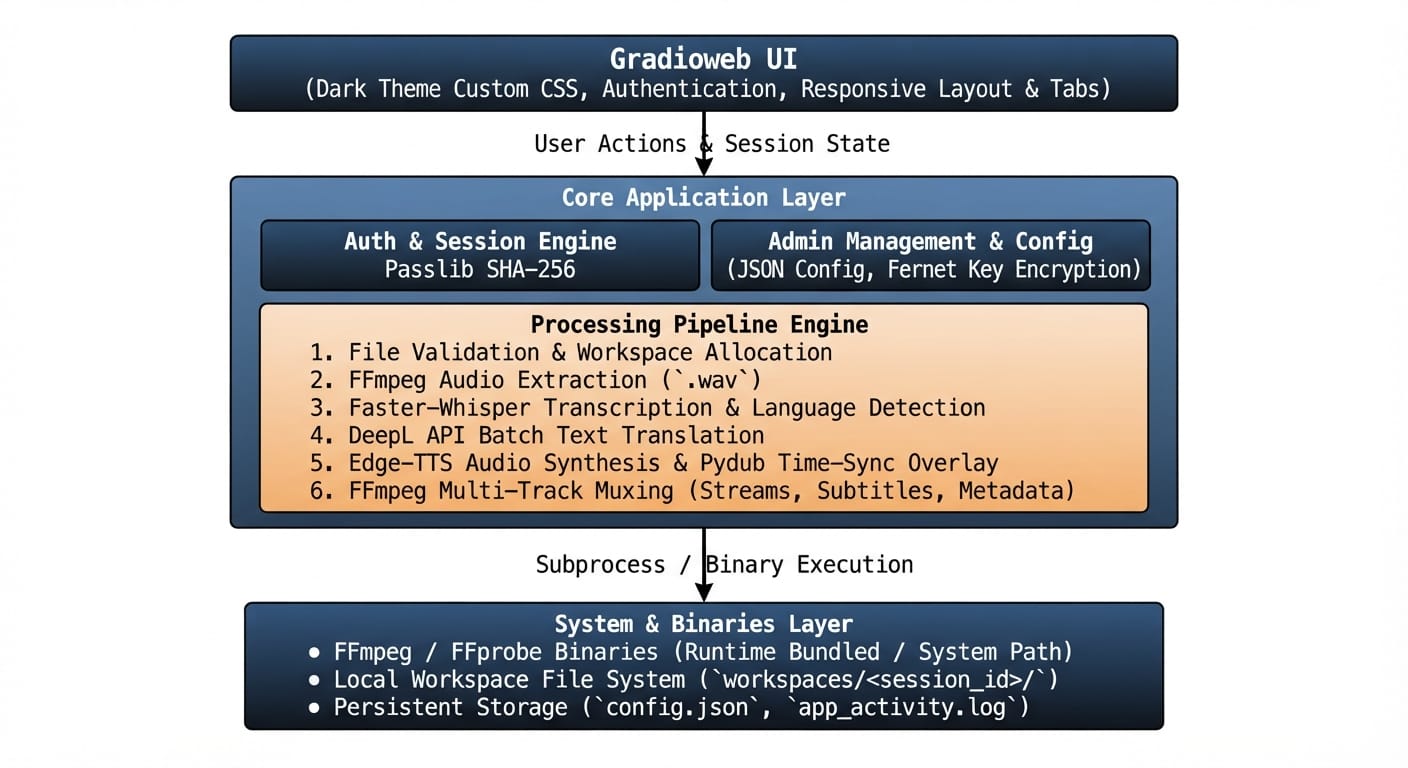
Key Architectural Highlights:
- Isolated Workspaces: Each session generates a unique UUID workspace directory under
workspaces/to safely isolate temporary audio chunks, subtitles, and intermediate media files. - Concurrency Guards: Per-user thread-safe locking tracks active processing tasks to prevent resource exhaustion based on the configured per-user limit (N).
- Encrypted Configuration: Sensitive keys (such as the default DeepL API key) are stored encrypted via symmetric cryptography (
cryptography.fernet).